Stop scrolling through old messages to remember what mattered.
You may already have the information somewhere in your chats. The question is whether you can find it quickly when you need it, without scrolling through weeks of messages or remembering the exact words to search for.
Two different theories of connection.
For friendship and conversation memory
Choose ConvoMemory if you want to deliberately save a short, searchable memory after a conversation and revisit it before catching up again.
For networks and contact consolidation
Stick with WhatsApp, Messages or another chat app if you are comfortable searching existing conversations and don't want to duplicate notes.
Concise comparison.
You know they told you. You just can't find it.
You remember that a friend mentioned a difficult conversation with their manager, but you don't remember when. You could search your chat history if the conversation happened there. ConvoMemory lets you capture a concise memory after an in-person catch-up too, so the context isn't limited to messages sent in the app.
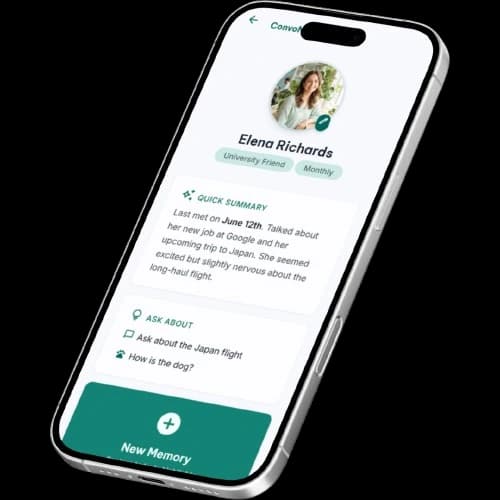
When to choose each app.
Choose ConvoMemory if:
Create a deliberate memory of in-person and online catch-ups, rather than relying on the original conversation being easy to find.
Choose WhatsApp and Messages if:
Use chat history if the original messages already contain what you need and searching them feels effortless.
Your questions answered.
How much effort does it take to save memories?
Searching chat history takes no extra capture effort, but finding a detail later can take time. ConvoMemory requires a short note or voice blurb after the conversation and organises it for future recall.
What happens to voice notes and personal data?
ConvoMemory voice notes are processed on-device and original audio is discarded; saved memories are stored securely. Messaging privacy and backups vary by app and settings. Check current policies, backup options and device access.
What can you do for free?
Your existing messaging app may be free or included with your device or plan. ConvoMemory is free for up to 3 friends, $10/month Premium or $100/year Annual.
What limitations might matter?
ConvoMemory doesn't automatically turn your entire chat history into memories. You choose what to capture, so it won't remove the need to search old messages for details you never saved.
Why not just search WhatsApp?
If the detail is in a message and you can find it, that may be the simplest option. ConvoMemory is useful for selected memories from in-person catch-ups and details you want to bring forward.
Does ConvoMemory read my chats automatically?
No. Its current workflow relies on the short notes or voice blurbs you choose to provide.
Will I need to write everything down twice?
Not necessarily. Save only the details you want to remember later. You don't need to duplicate every conversation or message.